Your Google Ads report shows a healthy number of leads. The cost per lead is coming down, your forms are being completed and the campaign appears to be performing well.
But when you speak to the sales team, the picture looks different.
Many enquiries are unsuitable. Some people are looking for a service you don’t offer. Others aren’t ready to buy, can’t be contacted or never progress beyond the first conversation.
This doesn’t necessarily mean the campaign has failed. It does mean that a lead count on its own can’t tell you whether your advertising is generating valuable business.
To understand that, you need to look at what happens after someone makes an enquiry.
A cheaper lead isn’t always a better lead
Cost per lead is a useful measure. It tells you how much you’re spending to generate an enquiry and helps you spot changes in campaign performance.
But it says nothing about whether those enquiries are a good fit for your business.
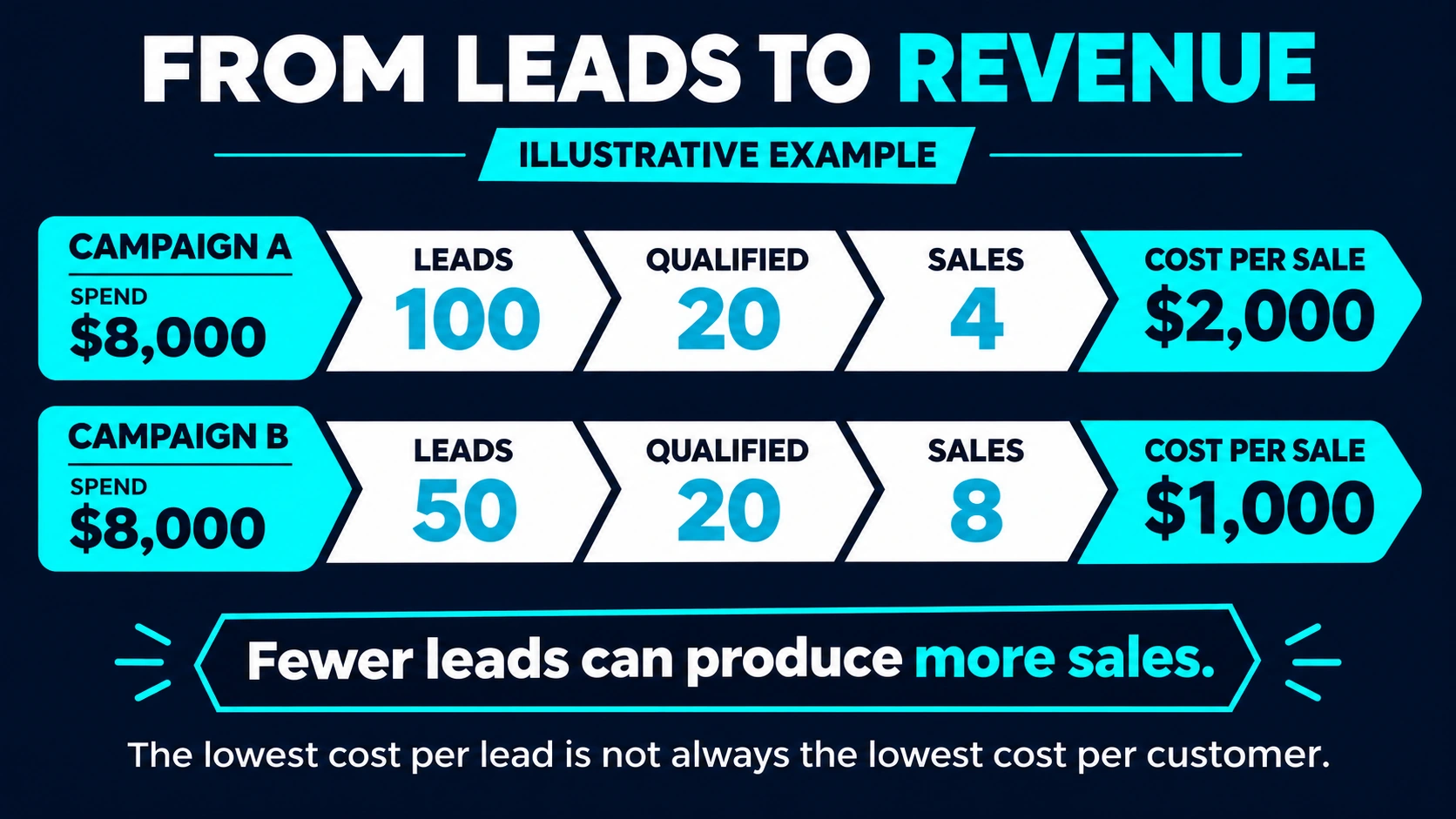
Imagine two campaigns, each with an $8,000 advertising budget:
| Measure | Campaign A | Campaign B |
|---|---|---|
| Enquiries | 100 | 50 |
| Cost per enquiry | $80 | $160 |
| Qualified leads | 20 | 20 |
| Sales | 4 | 8 |
| Advertising cost per sale | $2,000 | $1,000 |
This is a fictional example for illustration.
If you looked only at cost per lead, Campaign A would appear to be the stronger performer. It generated twice as many enquiries at half the cost.
Once you follow those enquiries through to a sale, Campaign B tells a different story. It produced fewer leads, but twice as many customers.
That doesn’t automatically make Campaign B the better investment in every situation. The value and profitability of those sales matter too. Eight small sales may be worth less than four larger ones. But the example shows why lead volume is only the beginning of the conversation.
Decide what a qualified lead looks like
Before you can measure lead quality, your marketing and sales teams need a shared definition of what makes an enquiry worth pursuing.
The right definition will depend on your business. A qualified lead might be someone who:
- Needs a service or product you actually offer.
- Is in a location you service.
- Fits your preferred customer profile.
- Has a realistic budget or project size.
- Has a genuine need and a reasonable timeframe.
- Can be contacted and is willing to discuss the next step.
Not every business needs to collect all this information in a form. Too many questions can discourage good prospects from making contact.
The aim is to agree on a practical definition your team can use consistently. For example:
A qualified lead is an enquiry from an organisation in Australia that needs one of our services and has a realistic project opportunity.
Your team can then record whether each enquiry met that definition and, where it didn’t, why.
Over time, those reasons become useful marketing information. If a campaign attracts enquiries from the wrong locations or for services you don’t offer, the issue may be in the targeting, the ad copy, the landing page or the way the offer is described.
Follow the lead beyond the form
A form submission is an event in Google Ads. For your business, it’s the start of a process.
Depending on your sales cycle, that process might look like this:
Enquiry → qualified lead → proposal or quote → sale → revenue
You don’t need a complicated system to start tracking it. A CRM is helpful, but a well-maintained spreadsheet can also reveal patterns if your lead volume is manageable.
For each enquiry, try to capture:
- When it arrived and how it was received.
- The campaign or source, where available.
- Whether it was qualified.
- The reason it was unsuitable, if relevant.
- Whether a quote or proposal was sent.
- Whether it became a customer.
- The value of the sale, where appropriate.
The most useful report connects those outcomes back to your marketing activity. It might show that one campaign generates many enquiries but few qualified opportunities, while another brings in fewer enquiries that progress more often.
It can also reveal issues outside the campaign itself. Good leads can be lost when a form notification fails, follow-up takes too long or prospects aren’t clear on what happens after they enquire. Reviewing the full journey helps you identify where the breakdown occurs.
Connect your CRM and Google Ads
Once your team is recording lead outcomes consistently, you can explore sending some of that information back to Google Ads.
Google supports importing offline conversion events, including qualified leads and converted leads. Its enhanced conversions for leads option can use customer-provided information, such as an email address, alongside your conversion data to help match offline outcomes to ad interactions.
In practice, this can help you see more than the initial enquiry. Depending on your setup, you may be able to report on events such as a lead being qualified or a sale being completed.
It can also provide a more useful signal for campaign optimisation. If the account is optimising only for form submissions, it has limited information about which enquiries turned into real opportunities. Feeding back reliable later-stage outcomes can help bring the campaign objective closer to the business objective.
A few things need attention before making that change:
- Agree on the definitions. A qualified lead should mean the same thing to everyone recording it.
- Check the data. Missing source information, inconsistent stages and duplicate records can undermine reporting.
- Choose useful milestones. A closed sale may be the ultimate goal, but if sales are infrequent or take months to complete, an earlier reliable milestone may provide more timely information.
- Review privacy and consent requirements. Make sure the way customer information is collected and used is appropriate for your business and the tools involved.
- Test before changing optimisation goals. Confirm that the events are being recorded and matched as expected, then review the impact of any bidding changes.
Not every sale will match neatly back to an ad interaction. Customers may use several devices, speak to your team more than once or take a long time to decide. Your CRM, advertising platform and financial records may therefore show different totals.
Use the data to make better decisions, while understanding its limits.
Look at revenue alongside lead quality
Qualified leads and sales are useful measures, but they don’t always tell the whole commercial story.
Consider two campaigns that each produce five customers. One may attract smaller, one-off purchases. The other may bring customers with larger projects or ongoing work.
Where your data allows, look at measures such as:
- Cost per qualified lead: advertising spend divided by qualified leads.
- Cost per sale: advertising spend divided by sales attributed to the campaign.
- Sales conversion rate: sales divided by the relevant group of leads.
- Revenue from those sales: the value of business recorded against the leads.
- Gross margin or customer value: a broader view of what those sales contribute.
Be clear about which costs are included. Advertising cost per sale, for example, doesn’t include agency fees, sales salaries or delivery costs unless you deliberately add them.
It’s also sensible to compare leads over a period long enough for them to progress through your sales process. If a typical sale takes three months, judging last week’s leads by closed revenue alone could lead you to switch off a promising campaign too early.
Use the feedback to improve the whole journey
The purpose of this work isn’t just to produce a more detailed report. It’s to make better decisions about where your advertising budget goes and what prospects experience.
A regular conversation between marketing and sales can uncover practical improvements:
- Wrong service enquiries: make your offer clearer in the ad and landing page.
- Wrong location: review geographic targeting and location language.
- Poor understanding of price: consider whether the page should provide clearer pricing guidance or explain the scope of the service.
- Qualified leads that don’t progress: review follow-up, response times and the next step in the sales process.
- Strong opportunities from a particular campaign: investigate what makes its audience, message and landing page effective.
Not every enquiry will become a customer, and no campaign produces perfect leads. The goal is to learn which activity is creating the best opportunities and to improve the experience for the people who are a good fit.
Ask a better question of your Google Ads report
Lead volume and cost per lead still have a place in your reporting. They help you understand whether campaigns are generating activity and whether acquisition costs are changing.
But they become much more useful when you can also answer:
- Which leads were a good fit?
- Which ones became opportunities and customers?
- What did those customers buy?
- What did it cost to acquire them?
- What can we learn from the leads that didn’t progress?
Connecting those answers takes collaboration between marketing, sales and whoever manages your customer data. It can start with a simple process and become more sophisticated over time.
The result is a clearer view of whether your Google Ads investment is generating enquiries, customers and revenue.
Want a clearer picture of what your campaigns are delivering? Explore our Google Ads management services or talk to the Integral Media team.