A new website can launch on time, keep its most important Google rankings and still make it harder for customers to find what they need.
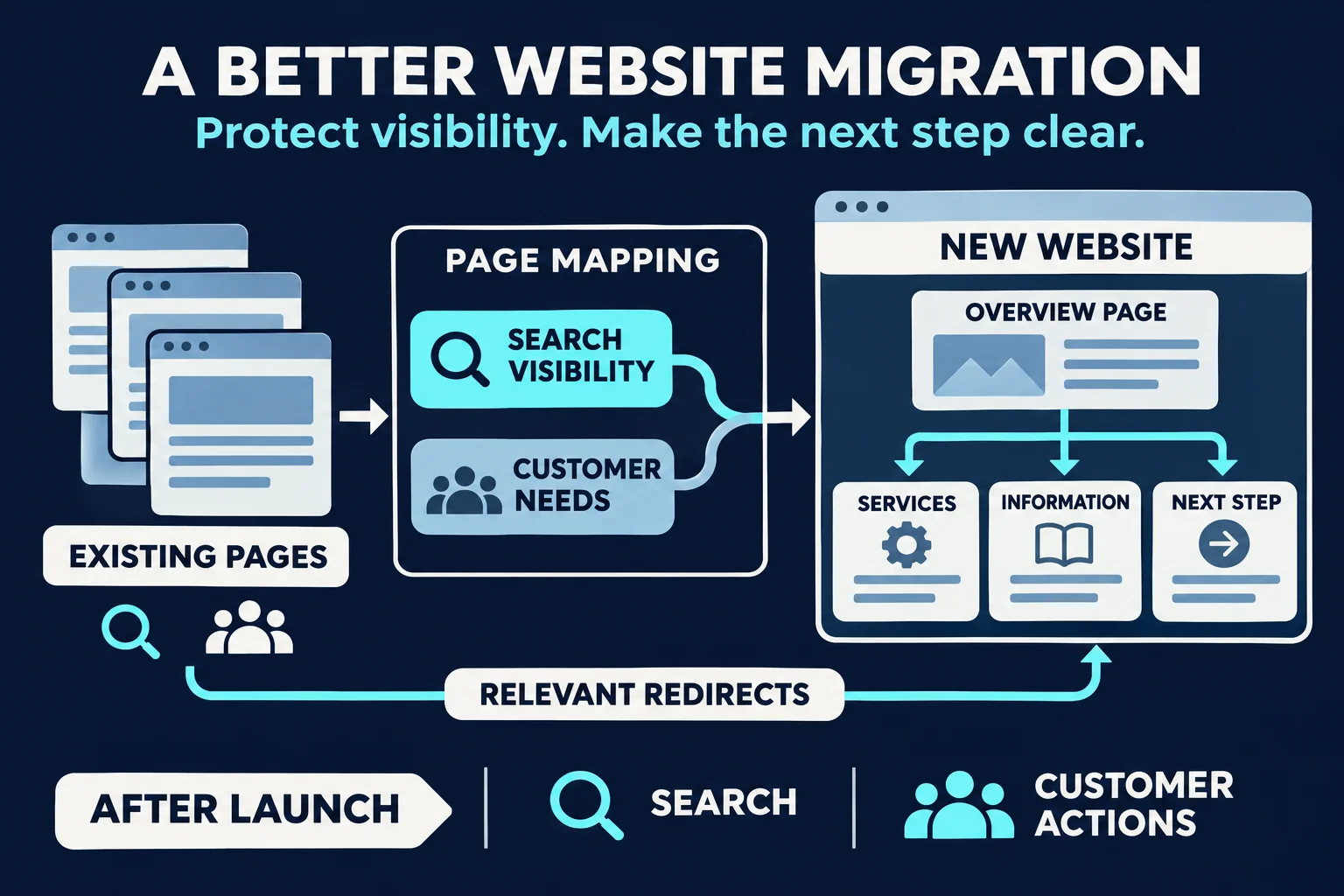
That’s because a successful website migration involves more than moving pages and setting up redirects. It also means making sure the new site’s structure reflects how people look for information, how they make decisions and what they need to do next.
We’ve been thinking about this while planning websites where the subject matter is complex and visitors may arrive with very different questions. In those situations, protecting existing search visibility is essential, but it’s only one part of the job.
Here’s how to plan a website migration that works for both search engines and the people using your site.
A technically sound migration can still create a poor experience
Imagine a business with a large website that has grown over several years. Different teams have added pages as new services, products and priorities emerged.
The site now contains useful information, but it’s spread across overlapping sections. Some pages use internal terminology that customers don’t recognise. Others cover similar topics without making it clear which page a visitor should choose.
During a redesign, the team maps the old URLs to the new ones and sets up redirects. The site launches, and its major rankings remain reasonably stable.
That’s a good start. But what if the new navigation still reflects the organisation’s internal departments rather than the questions customers have? What if a visitor lands on the right topic but can’t tell which service is relevant to them?
The migration may have protected existing traffic without solving the problem that prompted the redesign.
A useful question to ask throughout the project is:
When someone arrives on this page, can they understand where they are, find what they need and take a sensible next step?
Start with what customers are trying to do
Before deciding which pages belong in the new navigation, look at the different reasons people visit your site.
A prospective customer might want to compare services. An existing customer might need support. Someone at an earlier stage might be trying to understand a problem before they know what kind of help they need.
These visitors may use different words for the same topic, and they won’t necessarily enter through the home page.
Research can help you understand those differences:
- Search queries can show the language people use and the questions they ask.
- Website analytics can show which pages attract visitors and where people move next.
- Internal site search can reveal what visitors struggle to find.
- Customer service and sales conversations can highlight recurring questions, objections and misunderstandings.
- Existing content can show where useful information already exists, as well as where it’s duplicated or hard to locate.
None of these sources tells the whole story on its own. Together, they help you design around real customer needs rather than assumptions.
For example, search data might show that people look for a particular service by name. Conversations with your team might reveal that customers also need help understanding whether that service is appropriate for them. The new page can address both needs: clearly explain the service and help visitors decide what to do next.
Turn research into a clearer website structure
The next step is deciding how information should be organised.
This is where keyword research, content planning and navigation need to work together. It’s tempting to create a separate page for every search term, but a larger number of pages doesn’t automatically make a website more useful.
The goal is to group related information in a way that makes sense to a visitor.
An example: organising a complex service
Imagine a healthcare provider that offers several types of rehabilitation. Over time, its website has accumulated separate pages written by different departments:
- Physiotherapy services
- Recovery after surgery
- Mobility support
- Rehabilitation programs
- Specialist appointments
- Information for referring practitioners
Each page may have a purpose. But a person looking for help after surgery might not know whether they need “physiotherapy”, “rehabilitation” or a “specialist appointment”.
A clearer structure might bring those services together under a Rehabilitation and recovery section. From there, visitors could choose a path based on what they need:
- What rehabilitation services are available? An overview of services and who they help.
- I’m recovering from surgery. Where do I start? A recovery-after-surgery page explaining options and next steps.
- I need help with movement or mobility. A mobility support page linking to relevant services.
- I’m a GP or specialist making a referral. A dedicated referral page with requirements and contact details.
The right structure would depend on the organisation, its services and the evidence available. The example shows the principle: organise around the decisions visitors need to make, while making the relationships between services clear.
A good overview page can introduce the options. More detailed pages can answer specific questions. Links between them can help people move through the site without forcing every visitor down the same path.
Map the existing content before you move it
Once you have a proposed structure, assess the pages that already exist. Some will be worth keeping with minor changes. Others may need to be combined, rewritten or retired.
A content map brings those decisions together. For each significant page, record:
- Its current URL and proposed destination.
- What the page is for and who it helps.
- Whether it attracts relevant organic traffic or enquiries.
- Whether other pages cover the same information.
- Whether the content is accurate and still needed.
- Whether it should be retained, updated, merged or removed.
- What action a visitor should be able to take next.
This is also where search and customer experience can pull in different directions. That makes a deliberate decision important.
A page might receive organic traffic but contain outdated information. The answer isn’t necessarily to leave it untouched because it ranks. It may be better to update it, or to move its useful content into a stronger page that satisfies the same need.
Equally, a page with modest traffic may still be important if it helps existing customers, answers a critical question or supports people close to making an enquiry.
Redirect people to a relevant destination
When a URL changes, a redirect helps send visitors and search engines to the new location. But the destination needs to make sense.
If an old page about post-surgery rehabilitation moves to a new page covering the same topic, that’s a clear match. Redirecting it to a generic home page may leave visitors unsure where the information went.
Where pages are combined, make sure the new destination addresses the important needs previously served by each page. If content is genuinely obsolete and has no suitable replacement, decide how to retire it deliberately rather than sending everyone to an unrelated page.
Design each page as part of a journey
A well-organised navigation is helpful, but many visitors will arrive directly on an individual page from Google, an email or a shared link.
That page needs to work on its own.
Someone arriving for the first time should be able to understand:
- What this page is about.
- Whether it’s relevant to them.
- What information or options are available.
- What they can do next.
The next step won’t always be “contact us”. A visitor may need to compare services, understand costs, check eligibility or read about the process first.
Internal links should support those decisions. For example, a service overview might link to a more detailed page, a relevant FAQ and a contact pathway. A detailed page might link back to the overview for someone who realises they need a different service.
This is also a useful way to review calls to action. Rather than placing the same button everywhere, consider what the visitor is likely to need at that point in their journey.
Measure more than rankings after launch
A migration needs a plan for checking what happens after the new site goes live.
Search visibility remains an important part of that review. Monitor important pages and queries, check for crawl or indexing issues, and investigate unexpected changes in organic traffic. Some movement can happen during a migration, so look at the pattern and the pages affected rather than drawing conclusions from one day.
But also check whether the new experience is helping visitors.
Depending on the site and the quality of your tracking, useful measures may include:
- Whether visitors reach important service and information pages.
- Whether enquiry forms, booking links and phone links are being used.
- Whether key actions are being completed.
- Whether people use internal search to look for information that should be easier to find.
- Whether the sales or customer service team is receiving the same recurring questions.
- Feedback from customers and staff using the new site.
A change in one metric doesn’t automatically explain what went right or wrong. For example, fewer page views could mean people are finding answers more quickly. It could also mean an important page has become harder to discover. Look at the context and, where possible, observe people using the site.
A practical website migration checklist
Before your new site launches, make sure you can answer these questions:
- Do we understand the main reasons different audiences visit the site?
- Have we reviewed search queries alongside customer questions and business priorities?
- Does the proposed navigation use language visitors will understand?
- Have we mapped important existing pages to their new destinations?
- Do redirects lead to relevant pages?
- Have we preserved or improved information that customers rely on?
- Can someone arriving directly on a service page understand what to do next?
- Have we tested key journeys, forms and links?
- Do we know which search, engagement and enquiry measures we’ll review after launch?
- Is someone responsible for monitoring issues and making improvements after the site goes live?
Build a site that earns the traffic it receives
A website migration is an opportunity to do more than give an existing site a new look.
By bringing search research, content planning and customer journeys together, you can protect valuable visibility while making it easier for visitors to understand your offering and take the next step.
The best result is a website that attracts the right people and helps them accomplish what they came to do.
Planning a website redesign or migration? Talk to Integral Media about creating a site structure that supports your customers and your search visibility.